
How to Add Menu Dropdown on Hover in Shopify Dawn Theme
The menu dropdown on hover feature is a powerful UX enhancement for Shopify stores using the Dawn theme. This implementation allows users to access menu dropdowns simply by hovering over menu items, creating a more intuitive and modern navigation experience.
Benefits of Menu Dropdown on Hover
- Improved User Experience: Users can access submenus without clicking, making navigation faster and more intuitive
- Modern Design: Creates a cleaner, more professional appearance that matches user expectations from modern websites
- Space Efficiency: Reduces the need for additional navigation elements while maintaining functionality
- Enhanced Accessibility: Works alongside existing click functionality for all user types
Implementation Steps
This implementation adds a configurable setting that allows merchants to enable or disable the hover functionality based on their preferences.
Step 1: Add Theme Setting
First, navigate to config/settings_schema.json and add the following code to the header settings. If there’s no existing header settings section, you can create one around line 36:
{
  "name": "header",
  "settings": [
    {
      "type": "checkbox",
      "id": "enable_dropdown_on_hover",
      "label": "t:settings_schema.global.settings.enable_dropdown_on_hover.label",
      "default": false
    }
  ]
},
It will look like this:
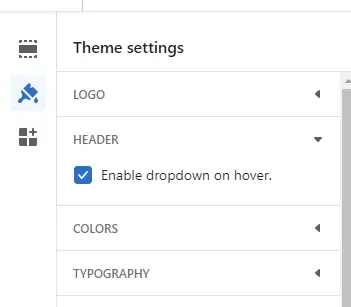
Step 2: Add Translation String
Next, navigate to locales/en.default.schema.json and add the following translation string to the global settings section:
"enable_dropdown_on_hover": {
  "label": "Enable dropdown on hover."
},
Step 3: Add JavaScript Functionality
Now, add the following script to your header.liquid file, wrapped in a conditional to only load when the setting is enabled:
{% if settings.enable_dropdown_on_hover == true %}
  <script>
    let items = document.querySelector(".header__inline-menu").querySelectorAll("details");
    items.forEach(item => {
      item.addEventListener("mouseover", () => {
        item.setAttribute("open", true);
        item.querySelector("ul").addEventListener("mouseleave", () => {
          item.removeAttribute("open");
        });
      });
      item.addEventListener("mouseleave", () => {
        item.removeAttribute("open");
      });
    });
  </script>
{% endif %}
How It Works
The JavaScript implementation works by:
- Targeting Menu Elements: Selects all
detailselements within the header’s inline menu - Adding Hover Listeners: Attaches
mouseoverevent listeners to each menu item - Managing Dropdown State: Sets the
openattribute when hovering and removes it when the mouse leaves - Nested Menu Handling: Includes logic to handle both the menu item and its submenu
Theme Settings Integration
Once implemented, this feature will appear in your theme settings as a simple checkbox that merchants can toggle on or off. This flexibility allows store owners to:
- Enable hover functionality for modern, streamlined navigation
- Disable it to maintain traditional click-based navigation
- Test different approaches to see what works best for their audience
Compatibility
This solution works seamlessly with:
- Simple Dropdowns: Standard nested menu items
- Mega Menus: Large, multi-column navigation structures
- Mobile Navigation: Automatically disabled on touch devices where hover isn’t available
- Accessibility Features: Maintains keyboard navigation and screen reader compatibility
Best Practices
When implementing this feature, consider these recommendations:
- Test Thoroughly: Ensure hover areas are large enough for easy interaction
- Add Visual Feedback: Consider CSS transitions for smooth dropdown animations
- Mobile Considerations: The hover functionality naturally doesn’t apply to touch devices
- Performance: The script is lightweight and only loads when the feature is enabled
Conclusion
The menu dropdown on hover functionality is an excellent addition to the Shopify Dawn theme that enhances user experience while maintaining flexibility for merchants. By implementing this as a configurable setting, you provide store owners with the ability to choose the navigation style that best suits their brand and customer needs.
This implementation demonstrates how small UX improvements can significantly impact the overall shopping experience, making navigation more intuitive and efficient for users while maintaining the clean, modern aesthetic of the Dawn theme.