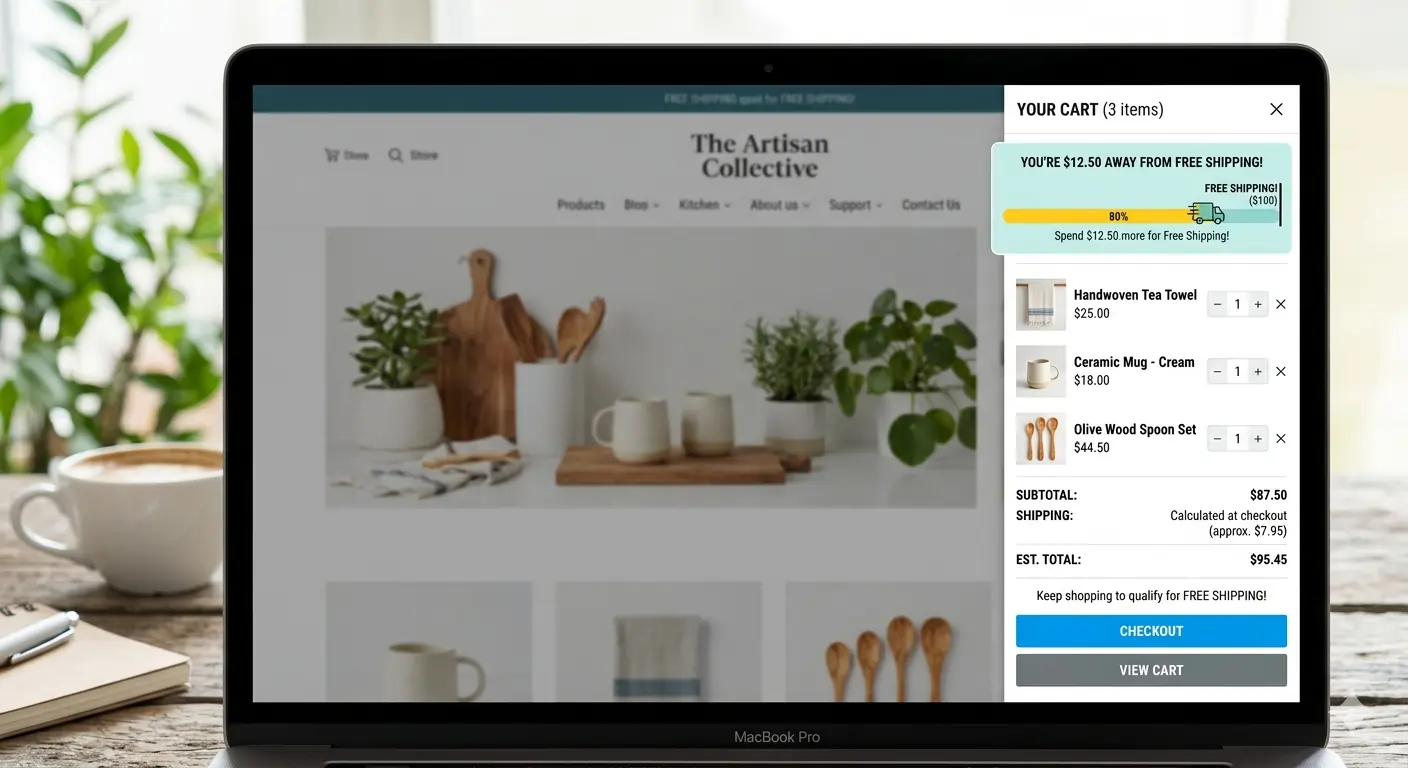
This feature adds a message on the cart drawer (mini-cart) that displays how far away a user is to receiving free shipping, in $ amount:
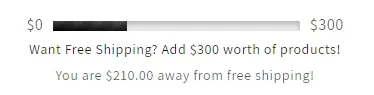
Free shipping thresholds are one of the most effective strategies to increase average order value (AOV) and improve conversion rates. In this comprehensive guide, I’ll show you how to implement a sophisticated free shipping threshold system in your Shopify minicart with real-time progress tracking, dynamic messaging, and conversion-optimized user experience.
Why Free Shipping Thresholds Matter
Before diving into implementation, let’s understand why this feature is crucial for e-commerce success:
Key Benefits
- Increased Average Order Value: Customers add more items to reach free shipping
- Reduced Cart Abandonment: Transparent shipping costs prevent surprises
- Improved Conversion Rates: Free shipping is a powerful psychological trigger
- Enhanced User Experience: Clear expectations build trust
Industry Statistics
- 90% of consumers say free shipping is the #1 incentive to shop more online
- 58% of shoppers add items to cart to qualify for free shipping
- 93% of shoppers will take action to qualify for free shipping
Implementation Strategy Overview
We’ll build a comprehensive free shipping system with:
- Real-time cart tracking
- Visual progress indicators
- Dynamic messaging
- Mobile-optimized design
- Performance optimization
Step 1: Shopify Theme Setup
Create the Free Shipping Configuration
First, let’s set up the theme configuration in your theme settings:
<!-- settings_schema.json -->
{
  "type": "header",
  "content": "Free shipping threshold settings"
},
{
  "type": "checkbox",
  "id": "show_progress_bar",
  "default": true,
  "label": "Enable progress bar"
},
{
  "type": "color",
  "id": "progress_bar_color_one",
  "default": "#000",
  "label": "Progress bar, first color"
},
{
  "type": "color",
  "id": "progress_bar_color_two",
  "default": "#212121",
  "label": "Progress bar, second color"
},
{
  "type": "text",
  "id": "free_shipping_cta",
  "label":"Free shipping Call To Action",
  "info": "This text could be used to warn the user the goal cart total to get free shipping."
  "placeholder": "Want free shipping?"
},
{
  "type": "text",
  "id": "free_shipping_fulfillment_message",
  "default": "Your order qualifies for free shipping!",
  "label":  "Free shipping fulfillment message"
},
{
  "type": "text",
  "id": "free_shipping_warning_before",
  "default": "You are",
  "label":  "Free shipping warning, message before goal"
},
{
  "type": "text",
  "id": "free_shipping_warning_after",
  "default": "away from free shipping!",
  "label": "Free shipping warning, message after goal"
},
{
  "type": "number",
  "id": "free_shipping_threshold",
  "label":"Free shipping threshold  ($)",
  "default": 75,
  "info": "If setting a shipping threshold, make sure your shipping settings are also set accordingly in the [Settings > Shipping and delivery](https:\/\/qore-theme.myshopify.com\/admin\/settings\/shipping) section in Admin."
}
Step 2: Liquid Template Implementation
Create the Free Shipping Component
<!-- snippets/free-shipping-progress.liquid -->
{% comment %}
  Free Shipping Progress Bar Component
  Usage: {% render 'free-shipping-progress' %}
{% endcomment %}
{% assign free_shipping_threshold = settings.free_shipping_threshold | times: 100 %}
{% if settings.show_progress_bar == true %}
  <div class="progress-bar-wrapper">
    $0 <progress class="animated" max="{{ free_shipping_threshold | times: 1 }}" value="{{ cart.total_price }}"></progress> {{ free_shipping_threshold | money_without_trailing_zeros }}
  </div>
{% endif %}

<div
  class="shipping-threshold-message"
  data-fulfillment-message="{{ settings.free_shipping_fulfillment_message }}"
  data-cta-message="{{ settings.free_shipping_cta }}"
  data-warning-before="{{ settings.free_shipping_warning_before }}"
  data-warning-after="{{ settings.free_shipping_warning_after }}"
  data-threshold="{{ free_shipping_threshold }}"
  data-current="{{ cart.total_price }}">
  {% if cart.total_price >= free_shipping_threshold %}
    <h3>{{ settings.free_shipping_fulfillment_message }}</h3>
  {% else %}
    {% if settings.free_shipping_cta != blank %}
      <h3>{{ settings.free_shipping_cta }}</h3>
    {% endif %}
    <p>{{ settings.free_shipping_warning_before }} {{ free_shipping_threshold | minus: cart.total_price | money }} {{ settings.free_shipping_warning_after }}</p>
  {% endif %}
</div>

<style>
  .shipping-threshold-message {
    display: flex;
    flex-direction: column;
    row-gap: 0.5rem;
    margin-bottom: 0rem;
    width: 100%;
    align-items: center;
  }
  .shipping-threshold-message > * {
    margin: 0;
    padding: 0;
    font-size: 1.4rem;
  }
  progress {
    width: 70%;
    height: 1rem;
    margin: 0.3rem 1rem;
    border-radius: 0;
  }
  .progress-bar-wrapper {
    width: 100%;
    display: flex;
    justify-content: center;
    align-items: center;
    align-content: center;
    flex-direction: row;
  }
  progress[value]{
    -webkit-appearance: none;
    appearance: none;
  }
  progress[value]::-webkit-progress-bar {
    background-color: #eee;
    border-radius: 2px;
    box-shadow: 0 3px 6px rgba(0, 0, 0, 0.26) inset;
  }
  progress[value]::-webkit-progress-value {
    background-image: -webkit-linear-gradient(-45deg, transparent 33%, rgba(0, 0, 0, .2) 33%, rgba(0, 0, 0, .2) 66%, transparent 66%), -webkit-linear-gradient(top, rgba(255, 255, 255, .25), rgba(0, 0, 0, .25)), -webkit-linear-gradient(left, {{ settings.progress_bar_color_one }}, {{ settings.progress_bar_color_two }});
    border-radius: 0px;
    background-size: 20px 15px, 100% 100%, 100% 100%;
  }
</style>
Step 3: JavaScript Implementation
Create the Free Shipping JavaScript Module
// assets/free-shipping.js
class FreeShippingProgress {
  constructor() {
    this.threshold = parseInt(document.querySelector('[data-threshold]')?.dataset.threshold) || 7500; // $75 default
    this.currentAmount = parseInt(document.querySelector('[data-current]')?.dataset.current) || 0;
    this.progressBar = document.querySelector('progress');
    this.message = document.querySelector('.shipping-threshold-message');

    this.init();
  }

  init() {
    this.bindEvents();
    this.updateProgress();
  }

  bindEvents() {
    // Listen for cart updates
    document.addEventListener('cart:updated', this.handleCartUpdate.bind(this));
    document.addEventListener('cart:added', this.handleCartUpdate.bind(this));
    document.addEventListener('cart:removed', this.handleCartUpdate.bind(this));

    // Listen for AJAX cart events
    if (window.Shopify) {
      document.addEventListener('shopify:cart:updated', this.handleCartUpdate.bind(this));
    }
  }

  handleCartUpdate(event) {
    const cart = event.detail.cart || event.cart;
    if (cart) {
      this.updateProgress(cart.total_price);
    } else {
      // Fallback: fetch cart data
      this.fetchCartData();
    }
  }

  async fetchCartData() {
    try {
      const response = await fetch('/cart.js');
      const cart = await response.json();
      this.updateProgress(cart.total_price);
    } catch (error) {
      console.error('Error fetching cart data:', error);
    }
  }

  updateProgress(totalPrice = this.currentAmount) {
    const remainingAmount = Math.max(0, this.threshold - totalPrice);
    const progressPercentage = Math.min(100, (totalPrice / this.threshold) * 100);
    const isFreeShipping = totalPrice >= this.threshold;

    // Update progress bar
    if (this.progressBar) {
      this.progressBar.value = totalPrice;
      this.progressBar.max = this.threshold;
    }

    // Update message
    if (this.message) {
      const ctaElement = this.message.querySelector('h3');
      const warningElement = this.message.querySelector('p');

      if (isFreeShipping) {
        if (ctaElement) {
          ctaElement.textContent = this.getSuccessMessage();
          ctaElement.style.color = '#10B981';
        }
        if (warningElement) {
          warningElement.style.display = 'none';
        }
      } else {
        if (ctaElement) {
          ctaElement.textContent = this.getCTAMessage();
          ctaElement.style.color = '#374151';
        }
        if (warningElement) {
          const remainingFormatted = this.formatMoney(remainingAmount);
          warningElement.textContent = this.getWarningMessage(remainingFormatted);
          warningElement.style.display = 'block';
        }
      }
    }

    // Dispatch custom event
    document.dispatchEvent(new CustomEvent('free-shipping:updated', {
      detail: {
        threshold: this.threshold,
        current: totalPrice,
        remaining: remainingAmount,
        percentage: progressPercentage,
        isFreeShipping: isFreeShipping
      }
    }));
  }

  formatMoney(cents) {
    return new Intl.NumberFormat('en-US', {
      style: 'currency',
      currency: 'USD'
    }).format(cents / 100);
  }

  getSuccessMessage() {
    return document.querySelector('.shipping-threshold-message')?.dataset.fulfillmentMessage ||
           'Your order qualifies for free shipping!';
  }

  getCTAMessage() {
    return document.querySelector('.shipping-threshold-message')?.dataset.ctaMessage ||
           'Want free shipping?';
  }

  getWarningMessage(amount) {
    const beforeText = document.querySelector('.shipping-threshold-message')?.dataset.warningBefore || 'You are';
    const afterText = document.querySelector('.shipping-threshold-message')?.dataset.warningAfter || 'away from free shipping!';
    return `${beforeText} ${amount} ${afterText}`;
  }
}

// Initialize when DOM is ready
document.addEventListener('DOMContentLoaded', () => {
  new FreeShippingProgress();
});

// Export for potential reuse
window.FreeShippingProgress = FreeShippingProgress;
Step 4: AJAX Cart Integration
Update Your Cart Drawer
<!-- snippets/cart-drawer.liquid -->
<div class="cart-drawer" id="cart-drawer">
  <div class="cart-drawer__header">
    <h2 class="cart-drawer__title">Shopping Cart</h2>
    <button class="cart-drawer__close" aria-label="Close cart">
      <svg width="24" height="24" viewBox="0 0 24 24" fill="none">
        <path d="M18 6L6 18M6 6L18 18" stroke="currentColor" stroke-width="2" stroke-linecap="round"/>
      </svg>
    </button>
  </div>

  <div class="cart-drawer__content">
    <!-- Free Shipping Progress -->
    {% render 'free-shipping-progress' %}

    <!-- Cart Items -->
    <div class="cart-drawer__items" id="cart-items">
      {% for item in cart.items %}
        <div class="cart-item" data-variant-id="{{ item.variant_id }}">
          <div class="cart-item__image">
            <img src="{{ item.image | img_url: '100x' }}" alt="{{ item.title | escape }}" loading="lazy">
          </div>

          <div class="cart-item__details">
            <h3 class="cart-item__title">{{ item.product.title }}</h3>
            <p class="cart-item__variant">{{ item.variant.title }}</p>

            <div class="cart-item__quantity">
              <button class="quantity-btn quantity-btn--decrease" data-variant-id="{{ item.variant_id }}" aria-label="Decrease quantity">-</button>
              <input type="number" value="{{ item.quantity }}" min="1" class="quantity-input" data-variant-id="{{ item.variant_id }}" aria-label="Quantity">
              <button class="quantity-btn quantity-btn--increase" data-variant-id="{{ item.variant_id }}" aria-label="Increase quantity">+</button>
            </div>
          </div>

          <div class="cart-item__price">
            <span class="cart-item__line-price">{{ item.line_price | money }}</span>
            <button class="cart-item__remove" data-variant-id="{{ item.variant_id }}" aria-label="Remove item">
              <svg width="16" height="16" viewBox="0 0 16 16" fill="none">
                <path d="M2 4H14M5 4V3C5 2.44772 5.44772 2 6 2H10C10.5523 2 11 2.44772 11 3V4M13 4V13C13 13.5523 12.5523 14 12 14H4C3.44772 14 3 13.5523 3 13V4" stroke="currentColor" stroke-width="1.5"/>
              </svg>
            </button>
          </div>
        </div>
      {% endfor %}
    </div>
  </div>

  <div class="cart-drawer__footer">
    <div class="cart-drawer__totals">
      <div class="cart-total">
        <span>Subtotal</span>
        <span>{{ cart.total_price | money }}</span>
      </div>

      {% if cart.total_price < settings.free_shipping_threshold %}
        <div class="shipping-estimate">
          <span>Estimated Shipping</span>
          <span>{{ cart.total_price | times: 0.1 | money }}</span>
        </div>
      {% endif %}
    </div>

    <a href="/checkout" class="checkout-btn" aria-label="Proceed to checkout">
      Proceed to Checkout
    </a>
  </div>
</div>
AJAX Cart Update Script
// assets/cart-ajax.js
class CartAjax {
  constructor() {
    this.cartDrawer = document.getElementById('cart-drawer');
    this.init();
  }

  init() {
    this.bindEvents();
  }

  bindEvents() {
    // Quantity buttons
    document.addEventListener('click', (e) => {
      if (e.target.classList.contains('quantity-btn--decrease')) {
        this.updateQuantity(e.target.dataset.variantId, -1);
      } else if (e.target.classList.contains('quantity-btn--increase')) {
        this.updateQuantity(e.target.dataset.variantId, 1);
      } else if (e.target.classList.contains('cart-item__remove')) {
        this.removeItem(e.target.dataset.variantId);
      }
    });

    // Quantity input changes
    document.addEventListener('change', (e) => {
      if (e.target.classList.contains('quantity-input')) {
        const variantId = e.target.dataset.variantId;
        const newQuantity = parseInt(e.target.value);
        const currentQuantity = parseInt(e.target.getAttribute('data-current-quantity') || e.target.value);
        this.updateQuantity(variantId, newQuantity - currentQuantity);
      }
    });
  }

  async updateQuantity(variantId, change) {
    try {
      const response = await fetch('/cart/change.js', {
        method: 'POST',
        headers: {
          'Content-Type': 'application/json',
        },
        body: JSON.stringify({
          id: variantId,
          quantity: change
        })
      });

      const cart = await response.json();
      this.updateCartUI(cart);

      // Dispatch cart update event
      document.dispatchEvent(new CustomEvent('cart:updated', { detail: { cart } }));
    } catch (error) {
      console.error('Error updating cart:', error);
    }
  }

  async removeItem(variantId) {
    try {
      const response = await fetch('/cart/change.js', {
        method: 'POST',
        headers: {
          'Content-Type': 'application/json',
        },
        body: JSON.stringify({
          id: variantId,
          quantity: 0
        })
      });

      const cart = await response.json();
      this.updateCartUI(cart);

      // Dispatch cart update event
      document.dispatchEvent(new CustomEvent('cart:updated', { detail: { cart } }));
    } catch (error) {
      console.error('Error removing item:', error);
    }
  }

  updateCartUI(cart) {
    // Update cart items
    const cartItemsContainer = document.getElementById('cart-items');
    if (cartItemsContainer) {
      // Re-render cart items (you might want to use a template here)
      location.reload(); // Simple fallback
    }
  }
}

// Initialize when DOM is ready
document.addEventListener('DOMContentLoaded', () => {
  new CartAjax();
});
Step 5: Testing & Troubleshooting
Testing Your Implementation
Before deploying to production, test these scenarios:
- Empty Cart: Shows progress bar at 0% and CTA message
- Partial Progress: Updates correctly when items are added
- Threshold Met: Shows success message and removes warning
- Cart Updates: AJAX updates trigger progress bar changes
- Mobile Responsive: Works on all screen sizes
Common Issues & Solutions
Issue: Progress bar not updating
// Check if events are firing
console.log('Cart update event:', event);

// Verify threshold value
console.log('Threshold:', this.threshold);
console.log('Current total:', totalPrice);
Issue: Money formatting incorrect
// Use Shopify's money format instead
formatMoney(cents) {
  // Use Shopify's format if available
  if (window.Shopify && window.Shopify.formatMoney) {
    return window.Shopify.formatMoney(cents, window.Shopify.moneyFormat);
  }

  // Fallback to Intl.NumberFormat
  return new Intl.NumberFormat('en-US', {
    style: 'currency',
    currency: 'USD'
  }).format(cents / 100);
}
Issue: Progress bar not styled correctly
/* Add these styles to your theme CSS */
progress[value]::-moz-progress-bar {
  /* Firefox styles */
  background-image: linear-gradient(45deg,
    transparent 33%,
    rgba(0, 0, 0, .2) 33%,
    rgba(0, 0, 0, .2) 66%,
    transparent 66%);
}

progress[value]::-ms-fill {
  /* IE/Edge styles */
  background: #000;
}
Step 6: Performance Optimization
Lazy Loading for Better Performance
// Only initialize when cart drawer is opened
class LazyFreeShipping {
  constructor() {
    this.isInitialized = false;
    this.bindEvents();
  }

  bindEvents() {
    // Listen for cart drawer open
    document.addEventListener('cart:opened', () => {
      if (!this.isInitialized) {
        this.init();
        this.isInitialized = true;
      }
    });
  }

  init() {
    new FreeShippingProgress();
  }
}
Debounce Cart Updates
// Add to FreeShippingProgress class
debounce(func, wait) {
  let timeout;
  return function executedFunction(...args) {
    const later = () => {
      clearTimeout(timeout);
      func(...args);
    };
    clearTimeout(timeout);
    timeout = setTimeout(later, wait);
  };
}

// Use in bindEvents
this.handleCartUpdate = this.debounce(this.handleCartUpdate.bind(this), 300);
Step 7: Advanced Features
Product Recommendations for Threshold
// assets/threshold-recommendations.js
class ThresholdRecommendations {
  constructor() {
    this.threshold = 7500; // $75.00 in cents
    this.currentCartTotal = 0;
    this.recommendations = [];

    this.init();
  }

  async init() {
    await this.fetchCartData();
    await this.fetchRecommendations();
    this.renderRecommendations();
  }

  async fetchCartData() {
    try {
      const response = await fetch('/cart.js');
      const cart = await response.json();
      this.currentCartTotal = cart.total_price;
    } catch (error) {
      console.error('Error fetching cart data:', error);
    }
  }

  async fetchRecommendations() {
    const remainingAmount = this.threshold - this.currentCartTotal;

    if (remainingAmount <= 0) {
      return; // Already qualified for free shipping
    }

    try {
      // Fetch products that would help reach the threshold
      const response = await fetch(`/recommendations/products.json?product_id=${this.getHighestPriceProduct()}`);
      const data = await response.json();

      this.recommendations = data.products
        .filter(product => product.price <= remainingAmount * 1.5)
        .filter(product => product.price >= remainingAmount * 0.3)
        .slice(0, 3);
    } catch (error) {
      console.error('Error fetching recommendations:', error);
    }
  }

  getHighestPriceProduct() {
    // Return the most expensive product in cart for better recommendations
    // This is a simplified version - you'd implement this based on your cart data
    return null;
  }

  renderRecommendations() {
    if (this.recommendations.length === 0) return;

    const container = document.createElement('div');
    container.className = 'threshold-recommendations';

    container.innerHTML = `
      <div class="threshold-recommendations__header">
        <h3>Add these to get free shipping:</h3>
      </div>
      <div class="threshold-recommendations__products">
        ${this.recommendations.map(product => this.renderProduct(product)).join('')}
      </div>
    `;

    // Insert after free shipping progress
    const progressElement = document.querySelector('.free-shipping-progress');
    if (progressElement) {
      progressElement.parentNode.insertBefore(container, progressElement.nextSibling);
    }
  }

  renderProduct(product) {
    return `
      <div class="recommendation-product">
        <img src="${product.featured_image}" alt="${product.title}" class="recommendation-product__image">
        <div class="recommendation-product__info">
          <h4 class="recommendation-product__title">${product.title}</h4>
          <p class="recommendation-product__price">${product.price}</p>
          <button class="recommendation-product__add" data-variant-id="${product.variants[0].id}">
            Add to Cart
          </button>
        </div>
      </div>
    `;
  }
}

// Initialize recommendations
document.addEventListener('free-shipping:updated', (event) => {
  if (!event.detail.isFreeShipping) {
    new ThresholdRecommendations();
  }
});
Step 6: Performance Optimization
Debounce Cart Updates
// utils/debounce.js
function debounce(func, wait) {
  let timeout;
  return function executedFunction(...args) {
    const later = () => {
      clearTimeout(timeout);
      func(...args);
    };
    clearTimeout(timeout);
    timeout = setTimeout(later, wait);
  };
}

// Usage in free shipping class
this.handleCartUpdate = debounce(this.handleCartUpdate.bind(this), 300);
Cache Calculations
// Add caching to avoid recalculations
class FreeShippingProgress {
  constructor() {
    this.cache = new Map();
    // ... other initialization
  }

  getCachedCalculation(totalPrice) {
    const cacheKey = `calc_${totalPrice}`;

    if (this.cache.has(cacheKey)) {
      return this.cache.get(cacheKey);
    }

    const calculation = this.calculateProgress(totalPrice);
    this.cache.set(cacheKey, calculation);

    // Clear cache after 5 minutes
    setTimeout(() => this.cache.delete(cacheKey), 300000);

    return calculation;
  }
}
Step 7: Analytics Integration
Track Free Shipping Events
// analytics/free-shipping-analytics.js
class FreeShippingAnalytics {
  static trackThresholdReached(threshold, cartTotal) {
    if (window.gtag) {
      gtag('event', 'free_shipping_threshold_reached', {
        'threshold': threshold / 100,
        'cart_total': cartTotal / 100,
        'currency': 'USD'
      });
    }

    if (window.fbq) {
      fbq('track', 'CustomizeProduct', {
        'threshold': threshold / 100,
        'cart_total': cartTotal / 100
      });
    }
  }

  static trackAlmostThere(remainingAmount) {
    if (window.gtag) {
      gtag('event', 'free_shipping_almost_there', {
        'remaining_amount': remainingAmount / 100,
        'currency': 'USD'
      });
    }
  }

  static trackRecommendationClick(productPrice) {
    if (window.gtag) {
      gtag('event', 'free_shipping_recommendation_click', {
        'product_price': productPrice / 100,
        'currency': 'USD'
      });
    }
  }
}

// Integrate with free shipping updates
document.addEventListener('free-shipping:updated', (event) => {
  const { isFreeShipping, remaining, current } = event.detail;

  if (isFreeShipping) {
    FreeShippingAnalytics.trackThresholdReached(event.detail.threshold, current);
  } else if (remaining > 0 && remaining < 2000) { // Within $20
    FreeShippingAnalytics.trackAlmostThere(remaining);
  }
});
Step 8: Mobile Optimization
Responsive Design Enhancements
/* Mobile-specific styles for free shipping progress */
@media (max-width: 480px) {
  .free-shipping-progress {
    padding: 10px;
    margin-bottom: 12px;
  }

  .free-shipping-progress__header {
    gap: 8px;
  }

  .free-shipping-progress__message {
    font-size: 12px;
    line-height: 1.3;
  }

  .free-shipping-progress__track {
    height: 6px;
  }

  .free-shipping-progress__markers {
    font-size: 10px;
  }
}

/* Touch-friendly buttons */
.threshold-recommendations .recommendation-product__add {
  padding: 12px 16px;
  font-size: 14px;
  min-height: 44px; /* iOS touch target minimum */
}
Testing and Validation
Test Cases to Implement
- Empty Cart: Show full threshold amount
- Partial Progress: Correct percentage calculation
- Threshold Met: Success message and styling
- Cart Updates: Real-time updates
- Mobile Responsiveness: Touch interactions
- Performance: No layout shifts
- Accessibility: Screen reader compatibility
Performance Monitoring
// Monitor free shipping performance
const performanceObserver = new PerformanceObserver((list) => {
  list.getEntries().forEach((entry) => {
    if (entry.name.includes('free-shipping')) {
      console.log(`Free shipping operation took: ${entry.duration}ms`);
    }
  });
});

performanceObserver.observe({ entryTypes: ['measure'] });
Conclusion
Implementing a free shipping threshold in your Shopify minicart is a powerful conversion optimization strategy. This comprehensive implementation provides:
- Real-time progress tracking with smooth animations
- Dynamic messaging that adapts to cart state
- Mobile-optimized design for all devices
- Performance optimization for fast loading
- Analytics integration for tracking success
- Product recommendations to help customers reach thresholds
The key to success is testing different threshold amounts and messaging to find what works best for your specific audience and product mix.
Need help implementing a free shipping threshold in your Shopify store? As a senior Shopify developer, I can help you create a customized solution that drives conversions and increases average order value. Book a call for a consultation.