Headless Shopify with Astro: Edit Your Store Visually from the Browser
How I built a headless Shopify store with Astro that scores 100 on Lighthouse, and a cloud visual editor on Fly.io to manage pages, sections and media without touching code.
 Nathaly Rodriguez Senior frontend developer
Headless Shopify with Astro: Edit Your Store Visually from the Browser
The biggest objection to headless Shopify is never performance. It is editing. Once the storefront lives in code, every banner change, new landing page or reordered section becomes a developer ticket.
I wanted to see if that trade-off was really necessary. So I built Andromeda, a headless Shopify store with Astro, and put a visual editor in front of it that runs in the cloud. Merchandisers can manage sections, pages and media from a browser, and nobody has to open a code editor.
This post covers the architecture, the split of responsibilities that makes it work, how I deployed the editor on Fly.io, and when you should not do this.
Who Owns What
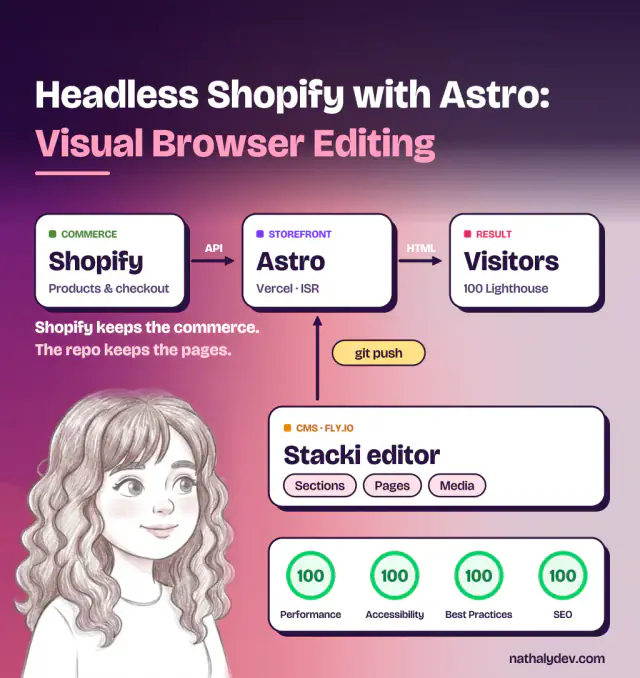
The whole setup depends on a clean split. Shopify keeps everything that is commerce. The repository keeps everything that is presentation.
| Lives in Shopify | Lives in the repository |
|---|---|
| Products and variants | Pages |
| Inventory | Page templates |
| Orders | Sections (hero, banners, product grids…) |
| Checkout | Header, footer and announcement bar |
| Blog posts | Design tokens and styles |
Shopify is still the source of truth for the things it is best at. The storefront reads that data through the Storefront API and parses it into Astro components.
Nothing about commerce is reinvented. The cart is created with the Storefront API, and when the customer is ready to pay they are redirected to Shopify’s own checkout. You keep Shopify Payments, taxes, discounts and fraud protection exactly as they are.
The Stack
- Astro for the storefront.
- Shopify Storefront API for products, collections, cart and blog content.
- Vercel for hosting, using server rendering with incremental static regeneration (ISR).
- Stacki as the visual editor.
- Fly.io to run Stacki in the cloud.
Why Astro for a Store
Astro ships no JavaScript by default. In a store, the pages people land on (home, collection, product) are mostly content with a few interactive islands: the cart drawer, quick add, a carousel. That is exactly the shape of site Astro is built for.
The result is a storefront that scores 100 in Lighthouse across the board. Because Astro renders HTML and the Shopify API is only used to fetch data and parse it, there is very little between the browser and the content.
If you want the framework comparison behind this choice, I wrote about it in Astro vs Next.js.
Fresh Prices Without Rebuilding
A common worry with Astro is that “static” means stale prices. It doesn’t have to.
Andromeda renders on request and caches the result with ISR, with a five-minute expiration. When a price, a stock level or a product image changes in Shopify, the storefront reflects it within five minutes. Nobody triggers a deploy.
// astro.config.mjs
export default defineConfig({
  output: 'server',
  adapter: vercel({
    isr: { expiration: 300 },
  }),
});
Changes to the repository (a new section, a new page) go through a normal deploy. That is the right behavior: code and layout changes are versioned, and commerce data is live.
Where Stacki Comes In
Stacki is a free, open source (MIT) visual builder for Astro. It edits a real Astro project on disk: it lays out pages, adjusts styles and edits content collections, and it writes plain .astro, JSON and Markdown files.
That last part matters. Stacki is not a database-backed CMS. There is no separate content store that can drift from the code. The editor changes the files in the repo, and Git is the history.
For Andromeda it acts as the CMS, because everything a merchandiser needs to manage is a section or a media field:
- Sections such as
Hero,ProductGrid,FeaturedProduct,CollectionList,BannerandRichTextare Astro components. Stacki reads each component’sPropsinterface and generates a typed settings panel for it. - Pages and templates are files in
src/pages, which the editor can create, reorder and edit. - Global sections (announcement bar, header and footer) live in a single data file, so one edit applies everywhere.
- Media can be picked from the project or pulled from Shopify.
Images That Come From Shopify
I did not want editors pasting image URLs. Every image field accepts a reference instead:
| Value | Result |
|---|---|
collection:men | The collection’s image |
product:slides | The product’s featured image |
product:slides#2 | The product’s second image |
file:hero-banner.jpg | A file uploaded in Shopify Admin → Content → Files |
https://… | Any image URL |
The storefront resolves these at render time. Marketing keeps uploading images where they already do, in Shopify Admin, and the site picks them up.
Running the Editor in the Cloud
Stacki is a desktop app, which is fine for a solo developer and awkward for a team. I wanted the editor available from any browser.
The web mode runs the same editor on a server. The Electron main process runs inside a Node server, the UI talks to it over a WebSocket instead of IPC, and the project’s astro dev server is proxied so the live preview works.
Deploying to Fly.io
Fly.io fits well because the editor is idle most of the time. The config is short:
# fly.toml
primary_region = "mia"

[env]
  STACKI_WORKSPACE = "/data/workspace"
  STACKI_DATA = "/data/stacki"

[[mounts]]
  source = "stacki_data"
  destination = "/data"

[http_service]
  internal_port = 8080
  force_https = true
  auto_stop_machines = "stop"
  auto_start_machines = true
  min_machines_running = 0

[[vm]]
  memory = "2gb"
  cpus = 2
Three decisions are worth explaining:
- A persistent volume. The cloned project and Stacki’s own settings live on
/data, so they survive restarts and redeploys. - Auto stop. With
min_machines_running = 0, the machine stops when nobody is editing and starts again on the next visit. You pay for editing time, not for a server sitting idle. - 2 GB of RAM.
astro devandnpm installrun on the same machine as the editor, and they need room.
Then the usual Fly flow:
fly launch --no-deploy --copy-config
fly volumes create stacki_data --size 10 --region mia
fly secrets set STACKI_PASSWORD=… GH_TOKEN=… GIT_USER_NAME=… GIT_USER_EMAIL=…
fly deploy
The Editing Workflow
- Open the editor and clone the store’s repository from GitHub.
- Edit sections and pages with the live preview beside you.
- Commit and push from the branch menu.
- Vercel sees the push and deploys.
Every change an editor makes is a commit. You get history, review through pull requests and rollbacks for free, and a mistake is a git revert away.
Security: Read This Before You Copy It
A cloud editor has a sharper edge than a normal CMS. Stacki includes a terminal and runs npm install and astro dev on the server. Anyone with the password effectively has a shell on that machine.
So:
- Use a long, unique
STACKI_PASSWORD. - Serve it only over HTTPS (Fly’s
force_httpshandles this). - Scope
GH_TOKENto the single repository it needs. - Keep storefront secrets in the server’s
.envand never commit them. - Do not share an instance with people who should not have server access.
One instance also equals one user. Several browser tabs share the same open project.
When This Is the Wrong Choice
Headless is not always an upgrade. I would not recommend this setup if:
- Your store works fine on a Shopify theme and the team already edits it comfortably in the theme editor.
- You depend on many Shopify apps that inject into theme files. Headless storefronts do not get those automatically.
- You do not have a developer available for the integration and the occasional fix.
If performance, design freedom and a clean separation between commerce and presentation matter more than the convenience of a theme, it is a strong option.
Key Takeaways
- Keep commerce in Shopify and presentation in the repository. That split is what makes everything else simple.
- Astro with ISR gives you both a 100 Lighthouse score and fresh prices.
- A visual editor that writes real files gives non-developers control without a separate content database.
- Fly.io with auto stop makes a cloud editor cheap, as long as you treat its password like a server login.
Want a Store Like This?
If you are thinking about moving a Shopify store to a headless architecture, or you want to know whether it is worth it for your case, I can audit your current store and tell you honestly.